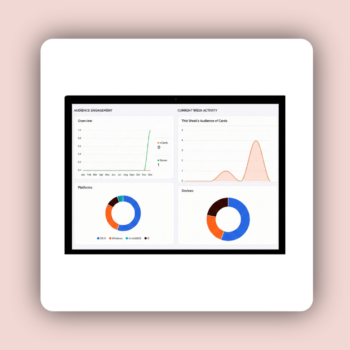
The Dashboard: Your Central Command Center
Actionable insights to track networking success and manage account status.
Key Metrics at a Glance
The dashboard is structured to give you immediate insights into your account and card activity:
Performance Overview Stats
Total Business Cards Created: A count of all the digital business cards you have published.
Customer Interactions: A critical metric showing the overall engagement your cards have generated, primarily focused on total views of your card.
Visual Analytics Graphs
Audience Engagement: Charts that track how visitors are interacting with your card (views), often broken down by time periods (e.g., daily, weekly).
Current Week Activity: Visual representations of your recent performance, helping you identify peak periods of networking activity.
Account and Card Status
Current Plan Status: A panel displaying your current subscription level and the remaining days in your subscription, so you are always aware of your account status.
Quick Stats: Tiles showing the number of active Business Cards and any active Stores currently associated with your account.
Best Practices for Using Your Dashboard
-
Monitor Card Views (Interactions):
Track the Customer Interactions metric closely. High view counts confirm that your sharing efforts (via your Personalized Link, QR Code, or NFC tap) are successful and that the PWA installation is keeping your card accessible.
-
Track Peaks in Activity
If you notice a spike in interactions on a specific day, cross-reference that with your recent networking activity (e.g., did you attend a conference, share your link in a large group, or send a marketing email?). This helps you learn which sharing methods are most effective.
-
Ensure Card Health
Use the quick stats to ensure all your intended cards are active. The dashboard provides the necessary overview to manage your digital presence efficiently from a single point.